


Industries
The store keeps selling. Whatever the morning does.
We build the tools that move a deal along — desking, credit intake, service booking — and we keep them running afterwards.

Free · Ten minutes · The report is yours either way
Twenty past eight, across the whole store
Three departments. One system underneath.
The shop, the sales floor and the F&I office each work on the screen their own job needs — and it is one system underneath, so the customer is typed once, the next touch is on the record, and the month is added up from the deals themselves.
Service
- What each job is waiting on Parts, approval, or a technician — written on the repair order itself, instead of a whiteboard nobody can read from the desk. Example repair order on a shop screen — service · repair order. Repair order no. 2287, opened 8:20. Vehicle: 2019 sedan · 41,208 miles. Customer states: Pulls right on the highway. Promised: Today · 5:30. The jobs on it: Multi-point inspection, on a technician; Front brakes, waiting on approval; Cabin filter, waiting on parts. Instead of the whiteboard by the parts window. One board, not three.
- The customer hears without being phoned The technician's photo, the approval and the pick-up time go out when the job changes — not when somebody finally reaches the callback list. Example service update on the customer's phone — Service update, Repair order 2287. Photo attached: Front brakes, photo from the technician. “Two items need your approval before we carry on.” The customer replies: “Approved”. “Ready for pick-up from 5:30 today.” — sent when the job changed. Nobody had to make the call.
- Monday's numbers, already up Units, closed orders and hours sold on one screen at six in the morning, instead of assembled by hand on a Sunday afternoon. Example Monday screen in the owner's office — owner · Monday. Last week, made at 6:00 this morning. Units delivered: 27; Repair orders closed: 96; Hours sold: 318. Instead of rebuilt by hand on Sunday. Up before the meeting.
- What you still owe the customer The second key, the touch-up, the plate — tracked until it is done, rather than remembered. Example list of what is still owed on a delivered car — Still owed: Second key, done; Touch-up, done; Front plate, Friday.
- Booked while the store was closed The caller who will not wait on hold picks a service time instead of ringing somebody else. Example service booking page, open overnight — Service booking: Thu 7:40, Thu 10:20, Fri 8:00. The time they took: Thu 10:20, Booked. Last night · 10:12 — nobody was in.
- A finance application that isn't email The customer fills it in on your own page and it lands in the deal file, locked. Example finance application on the store's own page — yourdealership.com. Finance application: complete. It lands in: Deal file 4412. Not an inbox.
- Typed once, not into four systems The customer and the car reach the systems that need them, instead of being retyped at every desk. Example of one entry reaching three systems — Typed at the desk: Customer and vehicle. It lands in: The deal, Service, Inventory.
Sales
- The up lands on a name Where it came from, the minute it arrived and whose it is — with the next touch already on the record, instead of a shared inbox everybody can see and nobody owns. Example new lead on the screen at the sales desk — sales · the up. New up, lead 1184, in at 6:40 last night. Came from: The website form. Asking about: 2023 SUV · stock 5512. Landed on: Dana R. The next touches on it: Call, today 9:40; Text, Thursday; Check in, next week. Instead of a shared inbox nobody owns. It has a name on it.
- The desk, on one screen The vehicle, the trade and the numbers in one place, worked side by side — instead of a calculator, a screenshot and a printed sheet. Example desking screen — sales · desking. Desking, deal 4412. Vehicle: 2023 SUV · stock 5512. Trade: 2016 hatchback · 78,400 miles. Payoff: quoted 8:05. Terms offered: 48 mo, 60 mo, 72 mo. Being worked: 60 mo. three options, from the same numbers. Instead of a calculator and a printed sheet. One screen, not four.
- What a salesperson opens on the lot The day's list on a phone, out at the car — instead of walking back to the desk to find out who is due a call. Example day list on a salesperson's phone — On the lot, Tuesday · your day. Ray O., 2023 SUV · here now, now; Jo K., Call back, 9:40; Marisol V., Trade appraisal, 1:15. opened at the car, not at the desk. Nothing to walk back for.
- The follow-up that actually happens The next touch sits on the record with a time against it, instead of on a list nobody opens. Example follow-up list for the day — Today's follow-ups: Call · Ray O., done; Text · Jo K., done; Call · Marisol V., 4:30.
- The deal board, without the spreadsheet Fresh, working, delivered — counted from the deals themselves, instead of kept right by one person. Example deal board — Deal board: Fresh: 14; Working: 9; Delivered: 6.
- One customer, not four systems The trade, the credit application and the last visit to the shop sit on one record, instead of half of each in four places. Example of one customer record — On one record: The trade, Credit application, Last visit in service.
- Where that car actually is On the front line, in the shop, or sold and waiting on a plate — instead of walking the lot to find out. Example inventory list, showing where each car is — Inventory: 5512, front line; 5498, in the shop; 5476, sold.
F&I
- The same menu, every customer The products laid out with their terms visible and the answer recorded — instead of whatever came to mind, on a legal pad. Example product menu on the screen the customer sees — f&i · the menu. Menu, deal 4412, presented the same way on every deal. Service contract, 72 mo · 75,000 mi, added; Maintenance plan, 36 mo, added; Tire and wheel, 60 mo, declined; Key replacement, 60 mo, declined. Instead of a legal pad. Nothing improvised.
- The deal file, and what is missing from it The application, the documents and the one thing still outstanding, written on the file itself — instead of a folder somebody has to go and find. Example deal file on the F&I screen — f&i · deal file. Deal file no. 4412, arrived from the desk, filled in. The documents on it: Credit application, in; Driver's license, in; Proof of insurance, in; Proof of income, outstanding. Instead of a folder somebody has to find. You can see what is missing.
- The month, assembled by the system Per copy, penetration and where the month stands, counted from the deals themselves rather than typed into a spreadsheet on the first. Example month-to-date screen in the F&I office — f&i · the month. This month, counted from the deals themselves. Per copy, Penetration, Month to date. Share of this month's deals — Service contract: 41%; Maintenance plan: 28%; Tire and wheel: 22%. Day 18 of 22 selling days. Instead of a spreadsheet rebuilt on the first. Nobody rebuilt it by hand.
- Every deal takes the same path Application, menu, documents, funding — the same steps in the same order, with the one it is on marked. Example of the steps a deal goes through — Deal 4412: Application, in; Menu presented, 3:14; Documents, 1 left.
- It arrives from the desk, filled in The customer, the vehicle and the trade come across from the sales record, instead of being typed again at the next desk. Example of a deal arriving from the sales record — From sales: Customer, car, trade. It lands in: The application, The menu, The deal file.
- Who signed what, and when Every signature carries a time and sits on the file, instead of a question about who had the folder last. Example list of what was signed, and when — Signed: Menu, 3:14; Contract, 3:22; Receipt, at delivery.
- The customer keeps a copy What they took and what they declined, in writing — instead of a memory of what was said at the desk. Example of the copy the customer keeps — Their copy: Service contract, added; Maintenance, added; Tire and wheel, declined.
These buttons change the illustration only — all three departments are written out above.
In the shop, the order says what every job is waiting on, so nobody walks out to ask. On the floor, an up lands on a named salesperson with the next touch already scheduled, instead of in a shared inbox and on a list nobody works. And in the F&I office the same menu is presented to every customer, with per copy, penetration and where the month stands assembled by the system rather than by hand the night before.
Ten minutes on a morning that suits the floor, then a written plan a few days later — yours either way.
Our own software
Everything above runs on Manas OS.
One product, built here. The drive, the sales floor, the finance desk and the month's numbers are apps in the same system instead of four systems that have to be told about each other — and so are inventory, the customer list, the schedule and the messages that go out.
- F&I Stats · the month. F&I Stats: PVR, back gross, penetration, products per deal and chargeback risk across the top; a table of producers underneath; and penetration by product and lender mix down the side.
- F&I Menu · the shelf. F&I Menu: deals open across the group, newest first, each with its unit and whether it still needs desking; below them the product shelf — vehicle service contract, powertrain, GAP, tyre and wheel — with retail, cost and back gross on every line.
- Service CRM · the drive today. Service CRM: the day's repair orders in four columns — scheduled, in bay, awaiting parts and ready — each card carrying the customer, the vehicle, the amount, the promised time and what it is waiting on, with the late ones flagged.
- Manas OS · every app, one place. The Manas OS home screen: a search box across apps, customers, VINs and deals; the day's numbers — units month to date, total gross, PVR and open repair orders — live from the DMS; a list of what needs attention; and the app springboard, carrying F&I Menu, F&I Stats, DMS, Sales CRM, Service CRM, Inventory, Messages, App Links, Administration, Settings, Payments, Equity Mining, Reputation and an App Store, above a dock.
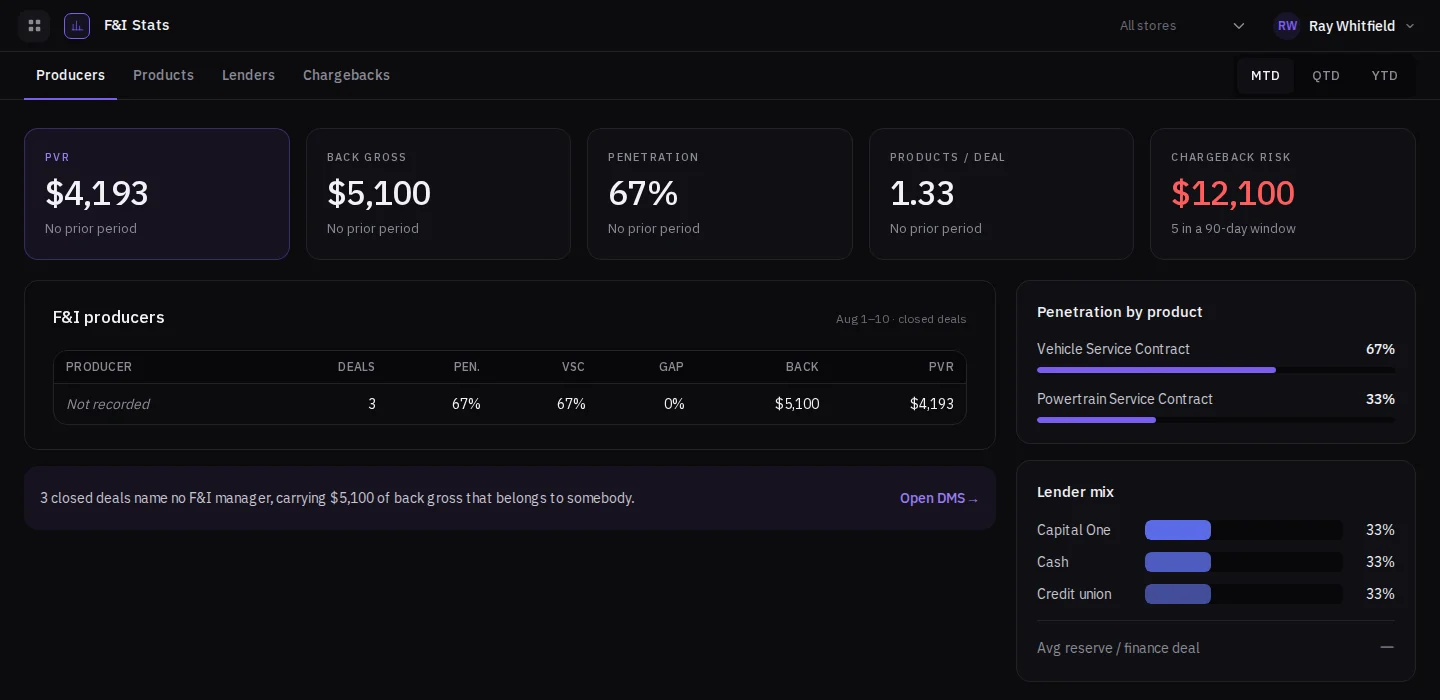
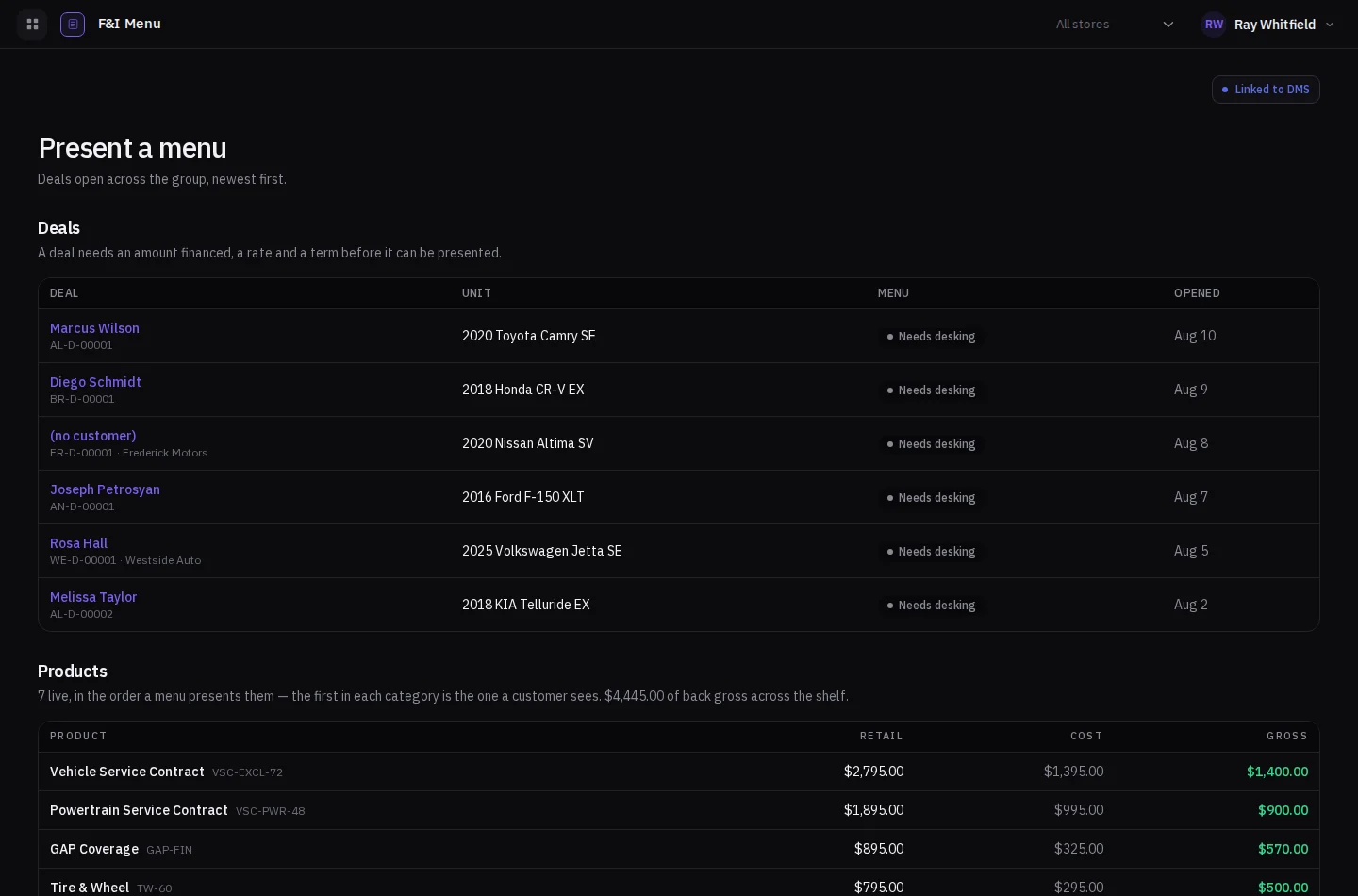
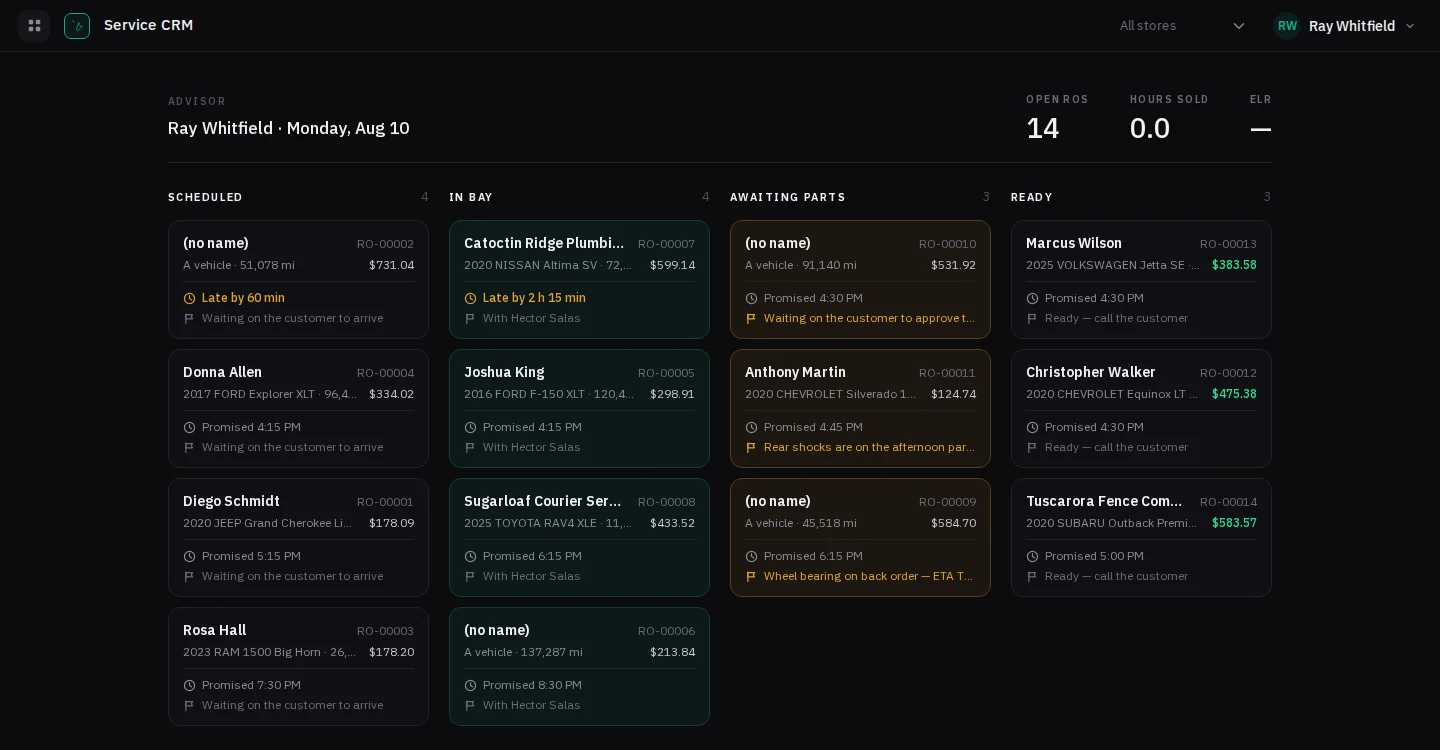
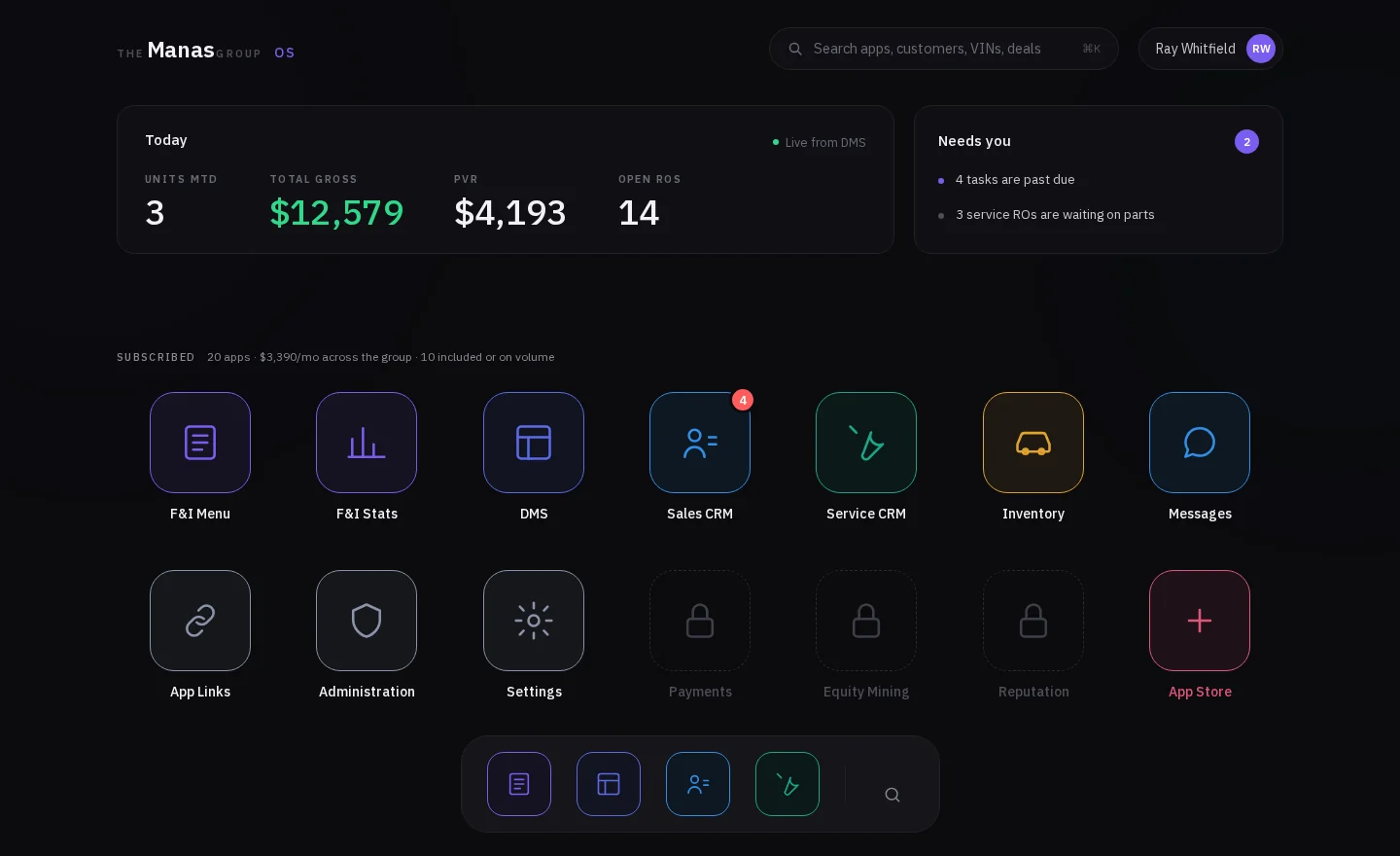
These are screenshots of the running product, not drawings of it. Every repair order, deal and dollar on them was put there by the software.
Service CRM
Every repair order on one board — scheduled, in the bay, waiting on parts, ready to call — with what each one is waiting on and who is late.
Sales CRM
The customer, the car and the deal in one record, so nothing is retyped at the next desk.
F&I Menu
A menu that presents: the shelf in the order the customer sees it, with retail, cost and back gross on every product.
F&I Stats
PVR, back gross, penetration, products per deal and chargeback risk — by producer, product and lender, without anybody rebuilding a spreadsheet.
One system means one place to look and one set of numbers everybody is reading. And the people who built it are the people who keep it running — a change is a conversation with whoever wrote that part, not a ticket in somebody else's queue.
Ten minutes, and we show you the thing itself rather than a slide. The written plan is yours either way.
What we build
We build it. Then we keep it running.
Web applications, client portals, booking systems and the small tools that take a job off somebody’s desk — designed and built for dealerships and service departments, then supported by the same people who wrote them.
One firm. The people who built it are the ones who answer afterwards.
A finance application that isn’t email
The customer fills it in on your own page and it lands locked, not in an inbox.
Service booking that answers after hours
The caller who will not wait on hold picks a slot instead of calling somebody else.
Inspection photos sent to their phone
The technician’s photo of the worn part reaches the customer, who approves the work from there.
Inventory added once, not five times
Put the car up once; the page follows, and a sold car comes down.
Bring it to the same ten minutes. We’ll tell you whether it is worth building before we quote it.
Four businesses under one roof. The same customer gets typed into most of them before a car ever leaves the lot.
So the gaps are filled in by hand. A spreadsheet for the deal board, a whiteboard for the shop, and one person who keeps both honest.
10 min
on a call, no charge
In pieces
usable before it is finished
Same team
builds it, then keeps it running
If you hire us
How the first build goes.
01First weeks
We read what is there
Whatever runs your work today keeps running while we learn how it is actually used.
02The first piece
Something you can use
One useful part, shipped early, instead of one delivery at the end you cannot see until it lands.
03After that
The people who built it
The same team keeps it running, so a change is a conversation rather than a project.
Ten minutes on a call. You keep the plan either way.
What we handle
What we build for you.
The same foundations underneath, shaped to how your week runs.
We start with the desk log
The spreadsheet beside the sales desk describes how deals actually move better than any brief would.
Typed once, not into four systems
The customer’s details reach the systems that need them, instead of being retyped at every desk.
The month-end report, built once
Units, gross, days in stock, hours sold — a screen instead of somebody’s Sunday afternoon.
What the shop is waiting on
Which cars are waiting on parts, on approval, on a technician — one board instead of three.
What you still owe the customer
The second key, the touch-up, the plate — tracked until it is done, not remembered.
The busy day is left alone
The people who built it keep it running, and changes wait for a slow Tuesday.
Other industries we build for
Start with the review. Ten minutes.
Ten minutes on a morning that suits the floor, then a written plan a few days later: what to build first, what can wait, yours either way.
Or ten minutes on the phone first
About half the reports say you’re in decent shape. If that’s you, we say so and leave.